 ドキュメント
YOLO11物体検出システムの実装
実験の目的
YOLO を用いて物体検出を実現できるようになること。
応用シーン
リアルタイム物体監視システム:防犯監視、人数カウント、スマート入退室管理などの用途で、Web インターフェースを通じてリアルタイム映像ストリームと検出結果を可視化して提供します。
機能要件
画像情報を取得して物体を検出し、検出した物体の色と個数を表示します。
ハードウェアの準備
| No. | 名称 | 数量 | 備考 |
|---|---|---|---|
| 1 | RDK X5 | 1 | 組み込みメインボード、32GB メモリカード付き。上位機システムを実行。 |
| 2 | カードリーダー | 1 | イメージシステムの書き込みに使用。 |
| 3 | USB カメラ | 1 | 画像の取得。 |
| 4 | 電源ケーブル | 1 | 給電。 |
| 5 | LAN ケーブル | 1 | ネットワーク接続。 |
| 6 | ディスプレイ(各自用意) | 1 | 操作用。 |
| 7 | キーボード・マウス(各自用意) | 1 | メインボードとの操作用。 |
回路接続
ハードウェアモジュール
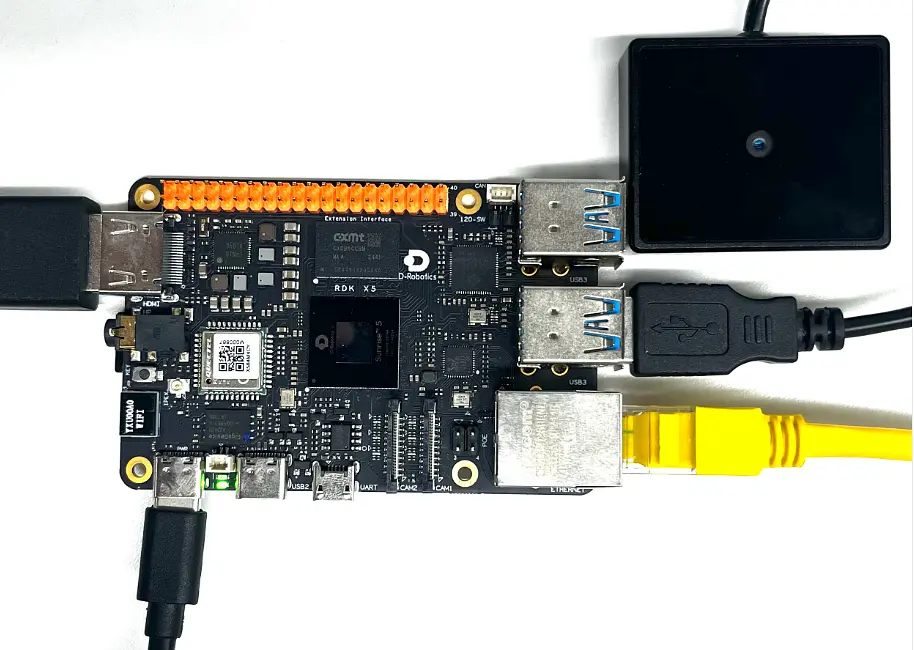
1.1ハードウェアインターフェース で RDK X5 のインターフェースを簡単に確認できます
実機の配線
下図を参考に接続し、その後ディスプレイ、キーボード・マウスを接続します(またはリモートアクセスを行います)。
ソフトウェア設計
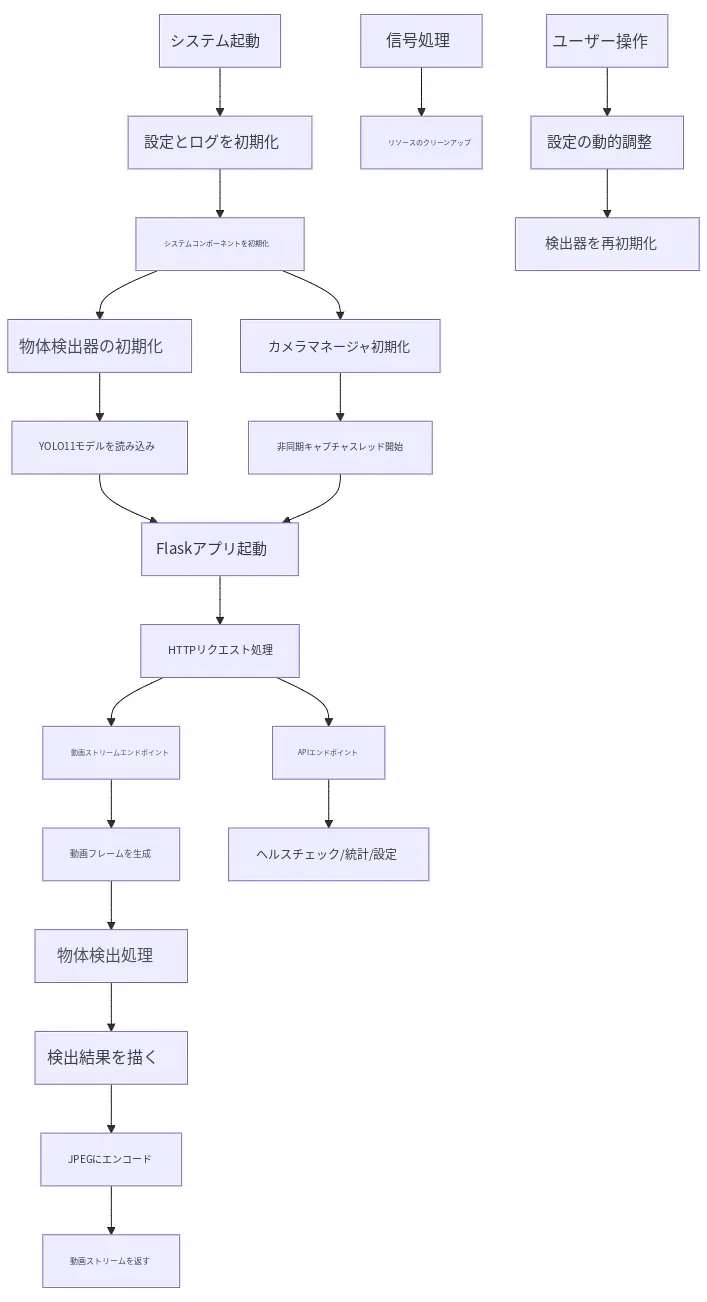
設計フローチャート
ソースコードのダウンロード
ソースコードファイル:object.rar
(リンクをクリックしてオンラインの説明を見ることもできます)(HumansX サポートより提供)
プログラムコード
コードの構成:
| フォルダ | コード | 機能 |
|---|---|---|
| object | main.py | 物体検出のメインプログラム |
| utils | base_model.py | 基本モデルクラス。モデルの読み込み、推論、入出力処理などの機能を提供します。 |
| yolo_detector.py | YOLO 物体検出の実装。YOLO11 モデルに基づく物体検出で、後処理や NMS などの機能を含みます |
具体的なコード:
完全なプロジェクトコードは(ソースコードのリンク)をクリックしてダウンロードしてください。
#!/usr/bin/env python3
"""
物体检测系统主程序
基于Flask的物体检测Web应用
"""

import logging
import signal
import sys
import time
import cv2
import numpy as np
import os
from pathlib import Path
from typing import Optional, Dict, Any
import json

from flask import Flask, request, jsonify, render_template, Response

# 添加项目根目录到Python路径
sys.path.insert(0, str(Path(__file__).parent))

from config import get_config, get_model_path, ObjectDetectionAppConfig
from app import ObjectDetector, CameraManager

# 全局变量
object_detector: Optional[ObjectDetector] = None
camera_manager: Optional[CameraManager] = None
app_config: Optional[ObjectDetectionAppConfig] = None
app_running = False
shutdown_requested = False

# 系统统计信息
system_stats = {
    'start_time': time.time(),
    'total_requests': 0,
    'detection_stats': {
        'total_frames': 0,
        'total_detections': 0,
        'fps': 0.0,
        'avg_inference_time': 0.0,
        'object_count': 0
    },
    'camera_stats': {
        'fps_actual': 0.0,
        'total_frames': 0
    }
}

# 当前设置(可动态调整)
current_settings = {
    'show_detection_boxes': True,
    'show_center_point': True,
    'show_stats': True,
    'confidence_threshold': 0.6
}

def init_logging_and_config():
    """初始化配置和日志"""
    global app_config
    app_config = get_config()

    # 配置日志
    logging.basicConfig(
        level=getattr(logging, app_config.logging.level),
        format=app_config.logging.format
    )

init_logging_and_config()
logger = logging.getLogger("ObjectDetectionApp")

def init_system():
    """初始化系统组件"""
    global object_detector, camera_manager, app_config

    logger.info("🚀 正在启动物体检测系统...")

    try:
        # 获取模型路径
        model_path = get_model_path()
        logger.info(f"模型路径: {model_path}")

        # 初始化物体检测器
        object_detector = ObjectDetector(
            model_path=str(model_path),
            conf_threshold=app_config.model.confidence_threshold,
            iou_threshold=app_config.model.iou_threshold
        )
        logger.info("✅ 物体检测器初始化完成")

        # 初始化摄像头管理器
        camera_manager = CameraManager(
            device_path=app_config.camera.device_path,
            width=app_config.camera.width,
            height=app_config.camera.height,
            fps=app_config.camera.fps
        )

        # 启动异步捕获线程(如果配置启用)
        if app_config.camera.async_capture:
            camera_manager.start_capture_thread()

        logger.info("✅ 摄像头管理器初始化完成")

        # 更新初始设置
        current_settings.update({
            'show_detection_boxes': app_config.web.show_detection_boxes,
            'show_center_point': app_config.web.show_center_point,
            'show_stats': app_config.web.show_stats,
            'confidence_threshold': app_config.model.confidence_threshold
        })

        logger.info("🎉 物体检测系统启动完成!")
        return True

    except Exception as e:
        logger.error(f"❌ 系统启动失败: {e}", exc_info=True)
        return False

def cleanup_resources():
    """清理系统资源"""
    logger.info("🔄 正在清理系统资源...")
    try:
        if camera_manager:
            camera_manager.release()
            logger.info("✅ 摄像头资源已清理")
    except Exception as e:
        logger.error(f"❌ 清理资源时出错: {e}")

def signal_handler(signum, frame):
    """信号处理器"""
    global shutdown_requested, app_running

    logger.info(f"收到信号 {signum},正在关闭应用...")
    shutdown_requested = True
    app_running = False

    # 强制中断可能的阻塞操作
    if camera_manager:
        camera_manager._capture_running = False

    # 立即开始资源清理
    cleanup_resources()

    # 强制退出程序
    import os
    os._exit(0)

def generate_frames():
    """生成视频流帧"""
    global system_stats, shutdown_requested
    fps_counter = 0
    fps_start_time = time.time()

    while not shutdown_requested and app_running:
        try:
            # 获取帧
            if app_config.camera.async_capture and camera_manager:
                success, frame, _ = camera_manager.get_latest_frame()
            elif camera_manager:
                success, frame = camera_manager.read_frame()
            else:
                success, frame = False, None

            if not success or frame is None:
                # 生成错误帧
                error_frame = np.zeros((480, 640, 3), dtype=np.uint8)
                cv2.putText(error_frame, "Camera Error", (200, 240),
                           cv2.FONT_HERSHEY_SIMPLEX, 1, (0, 0, 255), 2)
                frame = error_frame

            # 执行物体检测
            if object_detector:
                detection_result = object_detector.detect(frame)

                if detection_result['success']:
                    # 更新统计信息
                    system_stats['detection_stats']['object_count'] = detection_result['object_count']
                    system_stats['detection_stats']['total_frames'] += 1

                    detector_stats = object_detector.get_stats()
                    if detector_stats:
                        system_stats['detection_stats'].update(detector_stats)
                        if detector_stats.get('total_detections', 0) > 0:
                            system_stats['detection_stats']['avg_inference_time'] = (
                                detector_stats['total_inference_time'] /
                                detector_stats['total_detections']
                            )

                # 绘制检测结果(总是调用,但根据设置决定绘制内容)
                frame = object_detector.draw_results(
                    frame,
                    detection_result,
                    show_boxes=current_settings['show_detection_boxes'],
                    show_center=current_settings['show_center_point'],
                    show_stats=current_settings['show_stats']
                )

            # 更新FPS计算
            fps_counter += 1
            current_time = time.time()
            if current_time - fps_start_time >= 1.0:
                system_stats['detection_stats']['fps'] = fps_counter / (current_time - fps_start_time)
                fps_counter = 0
                fps_start_time = current_time

            # 编码帧为JPEG
            encode_params = [cv2.IMWRITE_JPEG_QUALITY, app_config.web.video_quality]
            _, buffer = cv2.imencode('.jpg', frame, encode_params)
            frame_bytes = buffer.tobytes()

            # 生成multipart响应
            yield (b'--frame\r\n'
                   b'Content-Type: image/jpeg\r\n\r\n' + frame_bytes + b'\r\n')

            # 控制帧率
            if app_config.web.stream_fps > 0:
                time.sleep(max(0, 1.0/app_config.web.stream_fps - 0.001))

        except Exception as e:
            if not shutdown_requested:
                logger.error(f"视频流生成错误: {e}")
            break

# 创建Flask应用
app = Flask(__name__, static_folder='static', template_folder='templates')

@app.route("/")
def root():
    """主页面"""
    system_stats['total_requests'] += 1
    return render_template("index.html")

@app.route("/video_feed")
def video_feed():
    """视频流端点"""
    system_stats['total_requests'] += 1
    return Response(
        generate_frames(),
        mimetype="multipart/x-mixed-replace; boundary=frame"
    )

@app.route("/api/health")
def health_check():
    """健康检查"""
    status = {
        "status": "healthy",
        "object_detector": object_detector is not None,
        "camera_manager": camera_manager is not None and camera_manager.is_opened,
        "config_loaded": app_config is not None,
        "uptime": time.time() - system_stats['start_time']
    }

    if not all([status["object_detector"], status["camera_manager"], status["config_loaded"]]):
        status["status"] = "unhealthy"
        return jsonify(status), 503

    return jsonify(status)

@app.route("/api/stats")
def get_stats():
    """获取系统统计信息"""
    stats = system_stats.copy()

    # 添加摄像头统计
    if camera_manager:
        camera_stats = camera_manager.get_stats()
        stats['camera_stats'].update(camera_stats)

    return jsonify(stats)

@app.route("/api/info")
def get_system_info():
    """获取系统信息"""
    info = {
        "app": {
            "name": app_config.app.name,
            "version": app_config.app.version,
            "environment": app_config.app.environment
        },
        "model": {
            "name": "YOLO11",
            "path": str(get_model_path()),
            "confidence_threshold": current_settings['confidence_threshold'],
            "iou_threshold": app_config.model.iou_threshold  # 使用配置中的固定值
        },
        "camera": camera_manager.get_camera_info() if camera_manager else {},
        "settings": current_settings
    }

    return jsonify(info)

@app.route("/api/settings", methods=["POST"])
def update_settings():
    """更新设置"""
    global current_settings

    if not request.is_json:
        return jsonify({"error": "Content-Type must be application/json"}), 400

    update_data = request.get_json()

    # 验证参数
    valid_keys = {'show_detection_boxes', 'show_center_point', 'show_stats', 'confidence_threshold'}
    for key in update_data.keys():
        if key not in valid_keys:
            return jsonify({"error": f"Invalid parameter: {key}"}), 422

    # 验证置信度阈值范围
    if 'confidence_threshold' in update_data:
        conf_val = update_data['confidence_threshold']
        if not isinstance(conf_val, (int, float)) or not (0.0 <= conf_val <= 1.0):
            return jsonify({
                "detail": [{
                    "loc": ["body", "confidence_threshold"],
                    "msg": "ensure this value is greater than or equal to 0.0 and less than or equal to 1.0",
                    "type": "value_error.number.range",
                    "ctx": {"limit_value": [0.0, 1.0]}
                }]
            }), 422

    for key, value in update_data.items():
        if key in current_settings:
            current_settings[key] = value
            logger.info(f"设置已更新: {key} = {value}")

    # 如果更新了检测阈值,需要重新初始化检测器
    if 'confidence_threshold' in update_data:
        try:
            global object_detector
            model_path = get_model_path()
            object_detector = ObjectDetector(
                model_path=str(model_path),
                conf_threshold=current_settings['confidence_threshold'],
                iou_threshold=app_config.model.iou_threshold  # 使用配置中的固定IOU值
            )
            logger.info("检测器已根据新阈值重新初始化")
        except Exception as e:
            logger.error(f"重新初始化检测器失败: {e}")
            return jsonify({"detail": "更新检测参数失败"}), 500

    return jsonify({"status": "success", "updated_settings": update_data})

@app.route("/api/settings/reset", methods=["POST"])
def reset_settings():
    """重置设置到默认值"""
    global current_settings

    default_settings = {
        'show_detection_boxes': app_config.web.show_detection_boxes,
        'show_center_point': app_config.web.show_center_point,
        'show_stats': app_config.web.show_stats,
        'confidence_threshold': app_config.model.confidence_threshold
    }

    current_settings.update(default_settings)

    # 重新初始化检测器
    try:
        global object_detector
        model_path = get_model_path()
        object_detector = ObjectDetector(
            model_path=str(model_path),
            conf_threshold=current_settings['confidence_threshold'],
            iou_threshold=app_config.model.iou_threshold  # 使用配置中的固定IOU值
        )
        logger.info("设置已重置,检测器已重新初始化")
    except Exception as e:
        logger.error(f"重置时重新初始化检测器失败: {e}")

    return jsonify({"status": "success", "settings": current_settings})

def main():
    """主函数"""
    global app_config, app_running

    # 设置信号处理器
    signal.signal(signal.SIGINT, signal_handler)
    signal.signal(signal.SIGTERM, signal_handler)

    # 初始化系统
    if not init_system():
        logger.error("❌ 系统初始化失败,退出程序")
        sys.exit(1)

    app_running = True

    logger.info(f"🌟 启动物体检测系统")
    logger.info(f"📍 服务地址: http://{app_config.server.host}:{app_config.server.port}")

    try:
        # 启动Flask服务器
        app.run(
            host=app_config.server.host,
            port=app_config.server.port,
            debug=app_config.server.debug,
            threaded=True,
            use_reloader=False  # 避免重载器导致的双重初始化
        )
    except KeyboardInterrupt:
        logger.info("收到中断信号,正在关闭...")
    except Exception as e:
        logger.error(f"服务器运行出错: {e}")
    finally:
        cleanup_resources()

if __name__ == "__main__":
    main()
操作手順
操作動画
具体的な操作(テキスト版)
回路接続が完了したら、リモートでターミナルにアクセスします:
- ターミナルにリモートアクセスします。ターミナルで次のコマンドを入力し、Enter キーを押します
ssh sunrise@192.168.8.111
パスワードは sunrise です。パスワードを入力して Enter キーを押すとログインが完了します。
- サービスを起動します。object フォルダに移動し、メインプログラム python main.py を起動します。
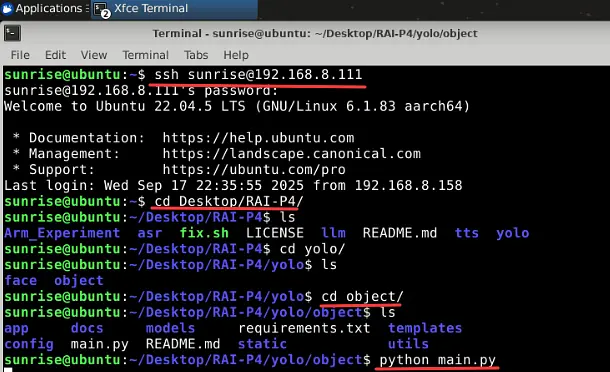
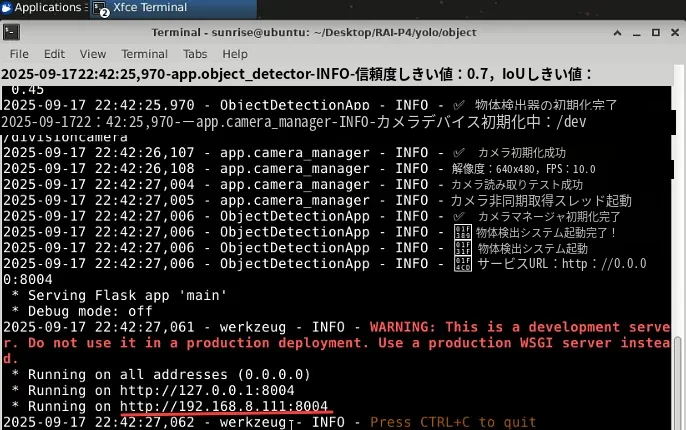
Enter キーを押して正常に読み込まれると、アクセスアドレス http://192.168.8.111:8004 が表示されます
アドレスをクリックするか、ブラウザにコピーすると物体検出システムが表示されます。物体が検出されるとマーキングされ、物体の個数がカウントされます。
下図は検出結果です。検出された物体の個数、推論時間、物体の色と信頼度が表示されます。

実験結果
物体を検出し、検出した物体の色と個数を表示します。
コミュニティ
資料のダウンロード・技術サポートについては、HumansX株式会社までお問い合わせください。